Why Should We Use React Query?
Why Should We Use React Query?
When you search for react-query, you will find that it is described as follows:
React Query is a data-fetching and state management library for React applications that simplifies fetching, caching, and updating data.
As the description states, react-query is a library that helps manage, cache, and update asynchronous data in React applications.
During the artfolio project, we adopted the approach of using react-query to manage asynchronous operations instead of the previous method using useEffect.
Let's take a look at the code for asynchronous processing using the existing useEffect.
Code Using useEffect
import React, { useEffect, useState } from 'react'

function App() {
  const [data, setData] = useState(null)
  const [isLoading, setIsLoading] = useState(false)
  const [error, setError] = useState(null)

  useEffect(() => {
    setIsLoading(true)
    fetchData()
      .then((response) => {
        setData(response.data)
        setIsLoading(false)
      })
      .catch((error) => {
        setError(error)
        setIsLoading(false)
      })
  }, [])

  return (
    <div>
      {isLoading ? <p>Loading...</p> : null}
      {error ? <p>Error: {error.message}</p> : null}
      {data ? <p>Data: {data}</p> : null}
    </div>
  )
}

export default App
On the other hand, using react-query allows us to write more concise code.
Code Using react-query
import React from 'react'
import { useQuery } from 'react-query'

function App() {
  const { data, isLoading, error } = useQuery('data', fetchData)

  return (
    <div>
      {isLoading ? <p>Loading...</p> : null}
      {error ? <p>Error: {error.message}</p> : null}
      {data ? <p>Data: {data}</p> : null}
    </div>
  )
}

export default App
useQuery is a hook provided by react-query that is used to fetch data asynchronously.
const { data, ...options } = useQuery(queryKey, queryFunction, options)queryKey: The query key indicates what data to fetch.queryFunction: The function that fetches the data and must return aPromise.options: Various options can be provided.
Introduction to useQuery
Now, let's look at an example applied in the actual artfolio project.


The image above shows the auction detail page.
The 22,350 won shown above and below represents the current auction price, and the current auction price must be synchronized in real-time with the server data due to the WebSocket integration.
Therefore, the moment you click to bid, the current auction price is updated, and both components should display the same value.
While it may seem like a simple task of passing data down through props drilling from a parent component,
the two components are not in a parent-child relationship and are separate, so they need to be managed globally or each needs to make requests to the server.
At this point, I thought managing server data as a global state was not a good approach, so I considered another method.
This issue was resolved by using the queryKey, which allows both components to fetch the same cached data when the same query key is used during requests.
To simplify the process, it can be described as follows.
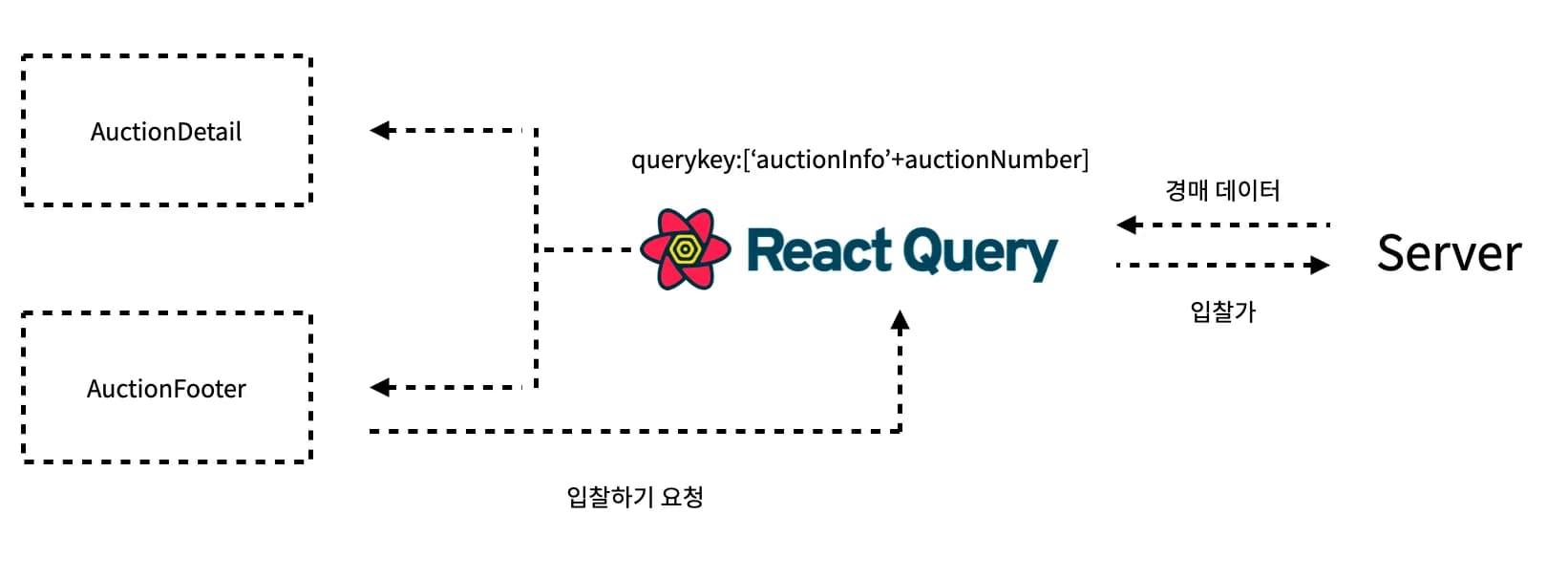

When applied in practice, you can see that the auction page content (chart) changes simultaneously with the bid.


Conclusion
In addition to this, I have mostly used react-query when working with asynchronous functions.
With variables like isLoading and isError, you can track the data state, and there are many convenient features such as automatic fetching of data based on query options and setting expiration times, so I plan to continue using it in the future.