My Own Syu and Suho Character Creation Retrospective
My Own Syu and Suho Character Creation Retrospective
What is My Own Syu and Suho Character Creation?
After a tumultuous first semester, I found myself with some free time after being rejected from all my internships.
While pondering what to do, I decided to enhance a project that I had previously only set up a framework for.
That project is called My Own Syu and Suho Character Creation.
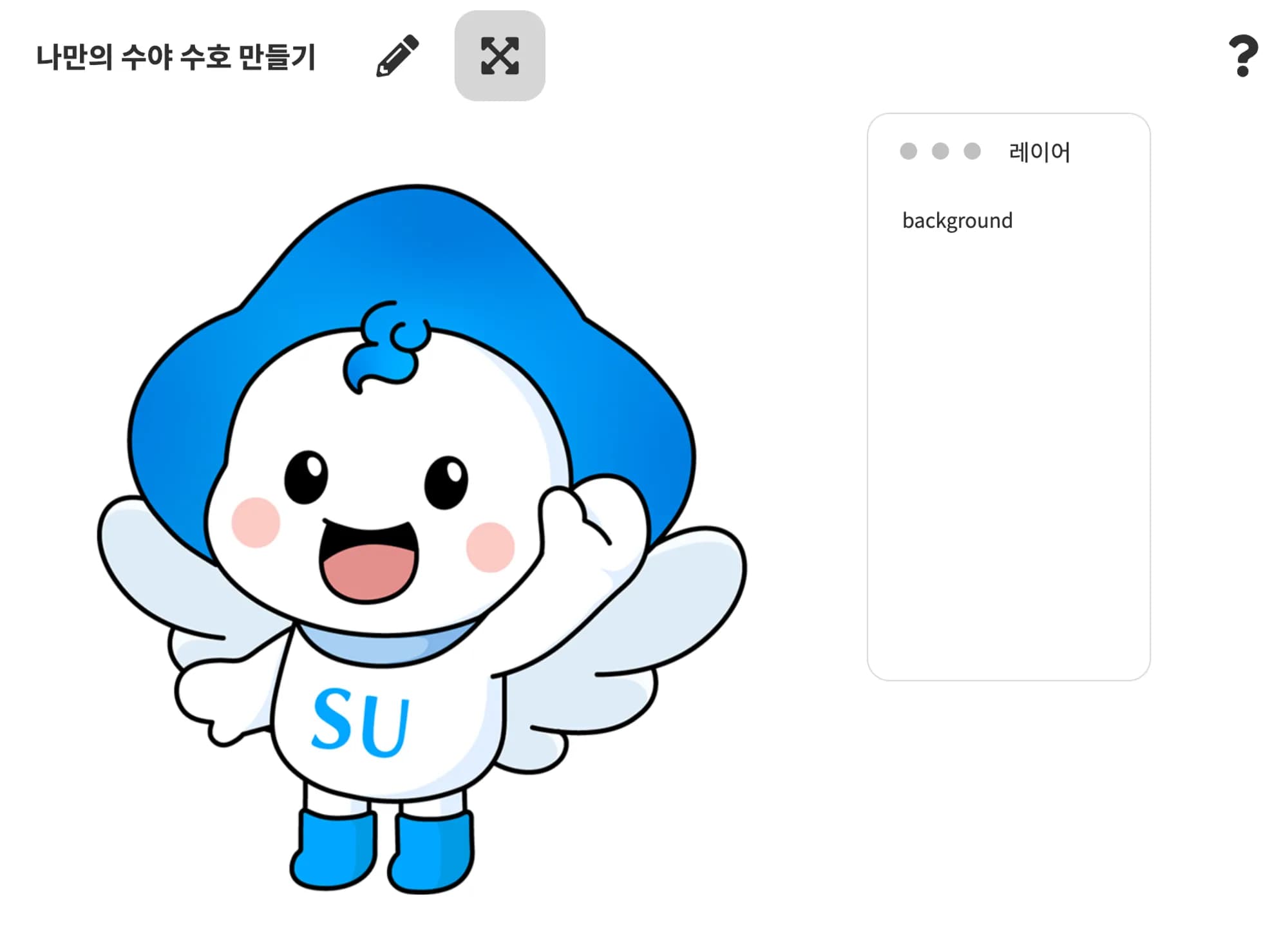
My Own Syu and Suho Character Creation is a program that allows you to customize Syu and Suho, the mascots of Sahmyook University.
The idea was inspired by a project called DevJeans.
The original structure involved selecting the characters Syu and Suho and drawing on them with a solid color pen.

How Will I Enhance It?
Currently, the project is a simple static page and is hosted through vercel.
I plan to add a backend to the project and deploy both the frontend and backend on the same domain.
Why Deploy on the Same Domain?
The backend will use nest connected to postgres and redis to serve as a REST API server.
Since users will need to save the drawings they create on the server, a user authentication feature is necessary.
In this case, I opted for a session method for user authentication, and here's why.
In previous team projects, whenever authentication was mentioned, everyone used the jwt method.
At that time, I thought it was just a common practice, but since I am responsible for the server this time, I needed a solid reason for my choice.
Curious, I researched and found the characteristics and key differences between sessions and jwt as follows:
Session: The server stores information about the connected user and sends a session ID to the client.
- Advantages: Since it is stored on the server, it is safe from exposure to the client. It is easy to expire on the server.
- Disadvantages: It can increase server load. Additionally, it complicates handling in a distributed environment.
JWT: A jwt is generated using user information and sent to the client.
- Advantages: Since it is stored on the client, it reduces the burden on the server and makes it easy to share state in a distributed environment.
- Disadvantages: Since jwt is stored on the client, security must be considered. It is difficult to expire.
In fact, for the scale of the project I designed, it wouldn't matter which method I chose, so I decided to implement the session method, which I had never tried before.
The session ID is stored as a cookie on the client. Therefore, when the client makes a request to the server, it must include the cookie in the header for it to be processed.
At this point, the client must adhere to the notorious CORS policy for frontend developers to send cookies.
For security reasons, browsers follow the Same-Origin Policy, which restricts access to resources only from the same origin.
However, since accessing resources from different domains occurs frequently, CORS (Cross-Origin Resource Sharing) allows access.
To comply with the CORS policy, the server must set the response headers accordingly.
Additionally, for security, the cookie's HttpOnly attribute should be set.
Access-Control-Allow-Origin: Indicates the allowed origin.
Access-Control-Allow-Methods: Indicates the allowed HTTP methods.
Access-Control-Allow-Credentials: Indicates whether to allow cookies and credentials.

SameSite=None: Allows cookies to be included in cross-site requests at all times, but requires the Secure attribute.
SameSite=Lax: Allows cookies to be included in cross-site requests only in certain situations (e.g., GET requests through navigation).
SameSite=Strict: Restricts cookies from being sent in all cross-site requests.
The client side must also set the request headers accordingly.
credentials: includeAt this point, if the request header is set to credentials: include and Access-Control-Allow-Origin is set to '*', a browser error will occur.
Therefore, to send cookies from a different domain, you must specify the URL in Access-Control-Allow-Origin.
Now, we are ready to send cookies.
To send cookies to another domain, SameSite=none must be set, which requires secure=true.
To use secure, the protocol must be https, so the server's protocol needs to be changed to https. However, when the server's protocol becomes https, it becomes a different domain from http, so the client must also be changed to https.
Once everything is changed, the settings for cookie transmission are complete when both the client and server are https.
I was also able to confirm that cookies were being transmitted correctly.
However… while conducting cross-browser testing, I discovered that cookies were not being transmitted in safari.
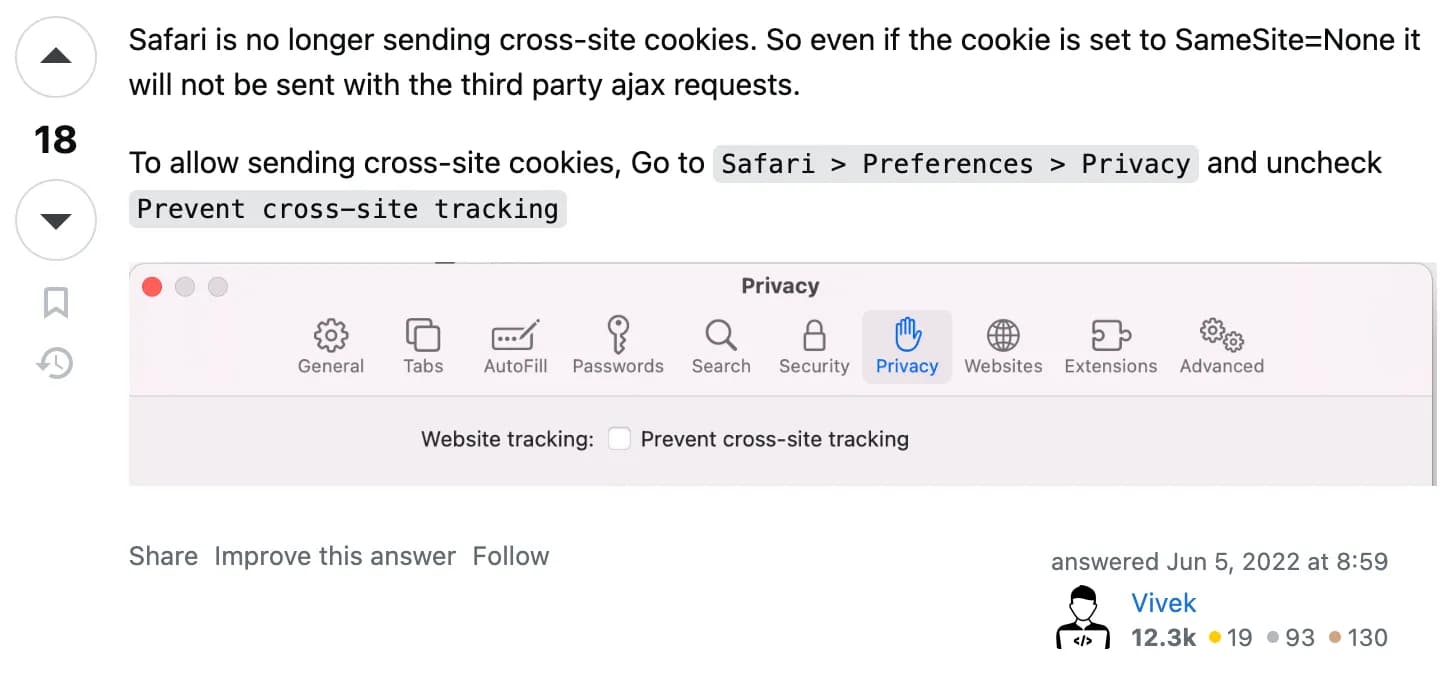

Upon searching, I found that even if SameSite=none is set, Safari's default settings have changed to prevent cookies from being transmitted between different domains.
Thus, to accommodate Safari, the client and server must be on the same domain.
Deploying on Oracle Cloud
I concluded that the client and server must be deployed on the same domain.
Therefore, the existing frontend, which was hosted on vercel, needs to be changed to be hosted on the cloud.
There are many well-known services in the cloud, such as aws, gcp, and azure. Most people commonly use aws.
However, due to the low performance of the free EC2 instances provided by aws, I chose oracle.
Oracle Cloud, as a relatively latecomer, offers better performance for its free-tier instances (4 cores, 24 GB) compared to other cloud services and provides free outbound traffic up to 10TB.
The downside is that there is a smaller user base, leading to less information and fewer solutions for errors.
Still, the performance aspect outweighs this disadvantage, so I decided on an Oracle instance.
I had previously used aws, and although the terminology is slightly different, the basic structure of the services provided is similar, so I was able to adapt quickly.
I also followed a well-organized blog for the overall process.
Deployment Process
The project was structured as follows:
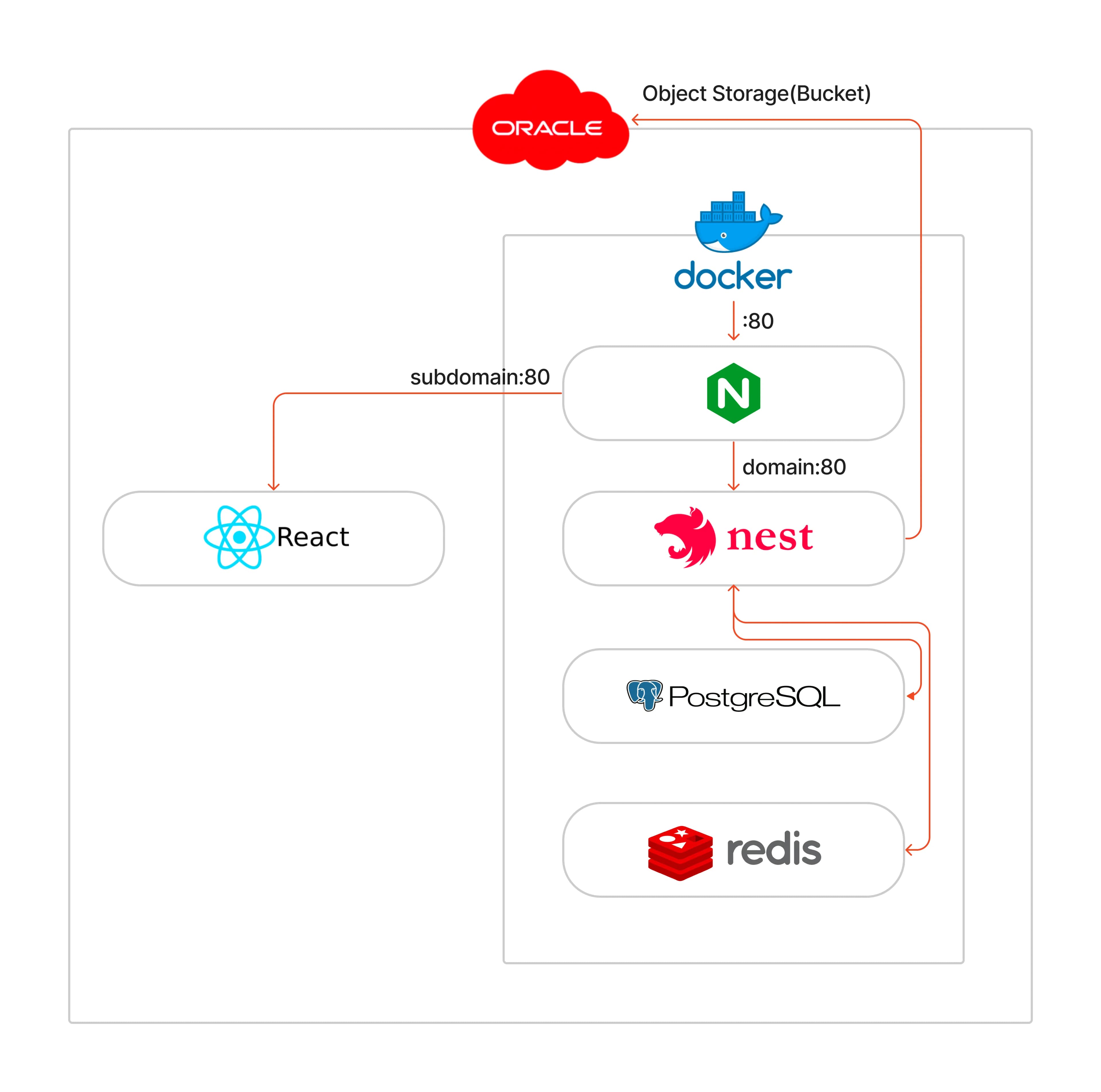

I utilized redis as the session database along with postgreSQL DB in nest, and I made efforts to deploy easily using docker and docker-compose.
It was my first time setting this up, and after doing it once, I gained a good understanding of the overall flow of the project.
Conclusion
While enhancing the project, I spent a lot of time thinking about how to make it easy for users to use.
Of course, since the target user base is primarily students from the university, I didn't expect to attract a large number of users.
However, out of curiosity about how many people would use it, I added Google Analytics to measure from the day of deployment.


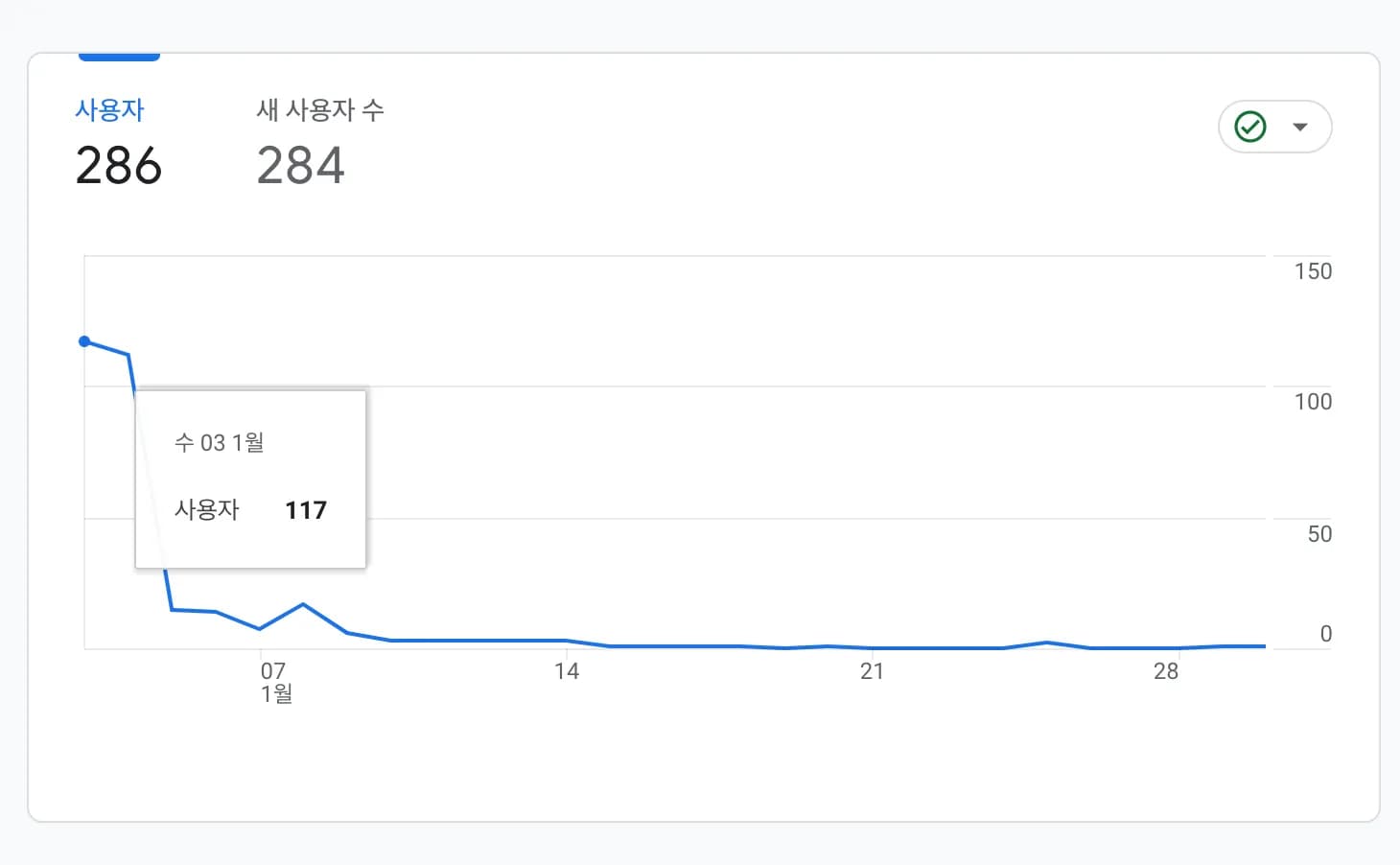

After deploying on January 3rd, about 300 people accessed the site, but it was clear that after a few days post-deployment, it did not attract much interest.
Through this deployment, I realized that drawing in users is not an easy task.
Nonetheless, I enjoyed the process of learning and creating, making it a satisfying project.