Implementing Next.js CI/CD with Docker using GitHub Actions
Implementing Next.js CI/CD with Docker using GitHub Actions
After setting up a project using Next.js, it's time to move on to the deployment stage.
While there is an easy way to deploy using Vercel, I decided to take this opportunity to challenge myself with CI/CD using the Oracle Cloud that I had previously set up.
What is CI/CD?
To briefly understand CI/CD, Redhat describes it as follows:
CI/CD stands for Continuous Integration and Continuous Delivery/Deployment, aiming to simplify and accelerate the software development lifecycle.
According to this description, a series of processes can be referred to as CI/CD:
- Continuous Integration (CI): This refers to the practice of frequently integrating code into a central repository by developers working simultaneously to prevent code conflicts or errors. It involves automatically building and testing new code periodically. If issues are found, notifications are sent to the team to resolve them.
- Continuous Deployment/Delivery (CD): Continuous deployment refers to automatically deploying new code changes to the production environment.
Here, I will proceed with the process of accessing the cloud and reflecting the code, building, and deploying whenever a new commit is registered in the repository.
Building Next.js with Docker
When deploying Next.js, the official documentation provides the necessary configurations.
I referred to this file to create .dockerignore and Dockerfile.
Note that to reduce the image size when building with Docker, you need to change the existing Next.js output setting to standalone.
/** @type {import('next').NextConfig} */
module.exports = {
  output: 'standalone',
}
Additionally, the structure of the Oracle Cloud that I am currently operating is as follows:
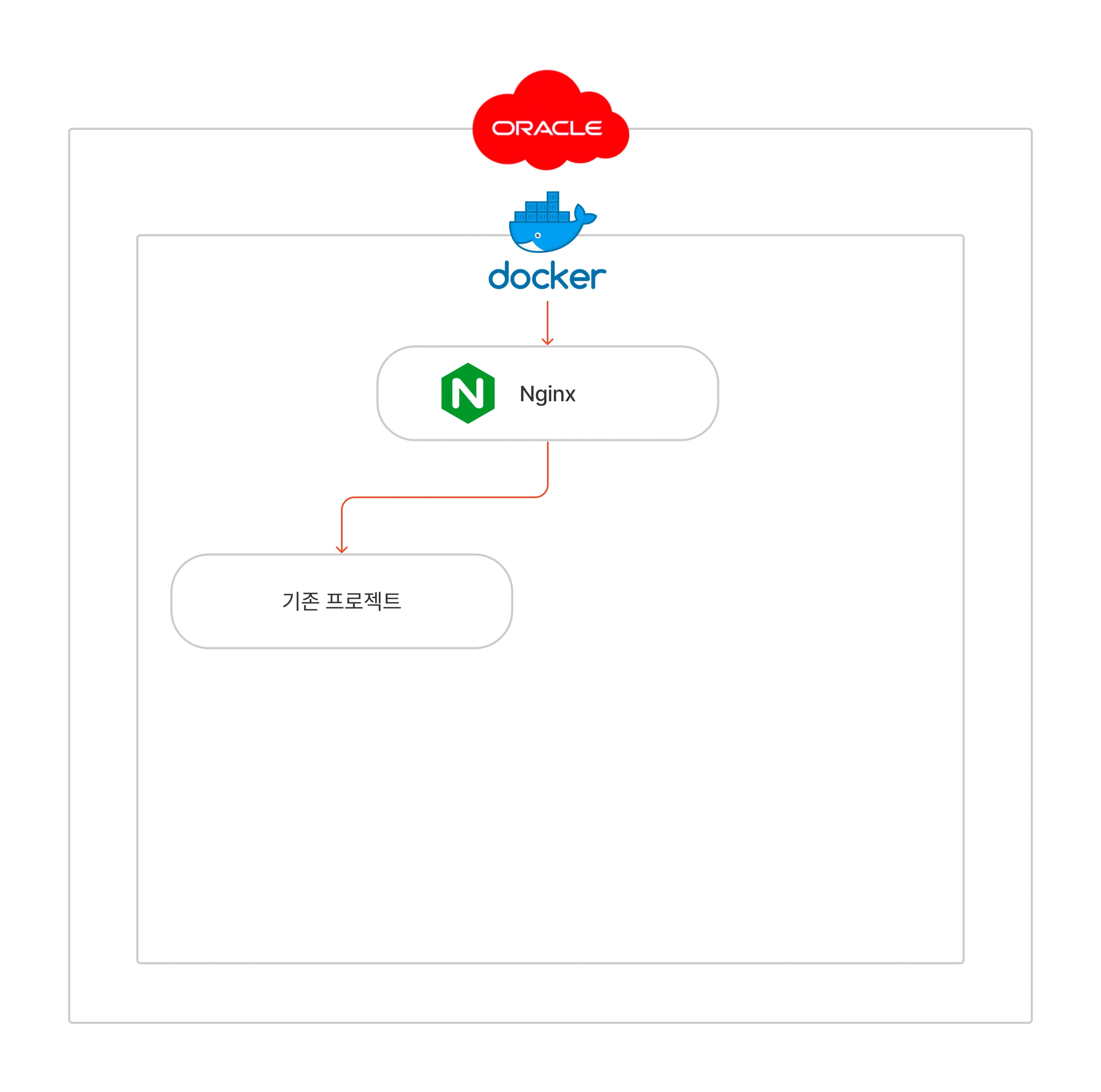

I am running Nginx in Docker, and since I am operating another project, I needed to connect the new Next.js project to the existing Nginx.
Therefore, I created a docker-compose file to connect it to Nginx through the same network configuration.
services:
  noveloper:
    container_name: noveloper
    image: noveloper
    ports:
      - '4000:4000'
    networks:
      - nginx-network

networks:
  nginx-network:
    external: true
Now, I need to add a workflow to detect commits through GitHub Actions and build with the new code.
Setting Up GitHub Actions
Let's add a new workflow in the actions tab of the repository where we want to add GitHub Actions.
name: deploy
on:
  push:
    branches: ['main'] # This will run when a new commit is pushed to the main branch.
jobs:
  deploy:
    runs-on: ubuntu-latest
    steps:
      - uses: actions/checkout@v3.3.0

      - name: execute remote ssh # Access the cloud instance via ssh.
        uses: appleboy/ssh-action@master
        with:
          host: ${{ secrets.REMOTE_SSH_HOST }}
          username: ${{ secrets.REMOTE_SSH_USERNAME }}
          key: ${{ secrets.REMOTE_SSH_KEY }}
          port: ${{ secrets.REMOTE_SSH_PORT }}
          script: |
            cd noveloper
            git pull origin main
            docker build -t noveloper .
            docker compose down
            docker compose up -d
            docker rmi $(docker images -f "dangling=true" -q)
I configured it to access the cloud instance via ssh when a new commit is pushed to the main branch, and registered the necessary host, username, key, and port as environment variables to ensure successful ssh access.
Once connected, the script is set up to execute the following processes:
cd noveloper: Navigate to the project foldergit pull origin main: Pull the new commitdocker build -t noveloper .: Build the Docker image for the projectdocker compose up -d: Run the Docker container based on the previously created docker-compose.ymldocker rmi $(docker images -f "dangling=true" -q): Remove old images
Result
Now, whenever a new commit is registered, the actions we set up will be executed as follows.
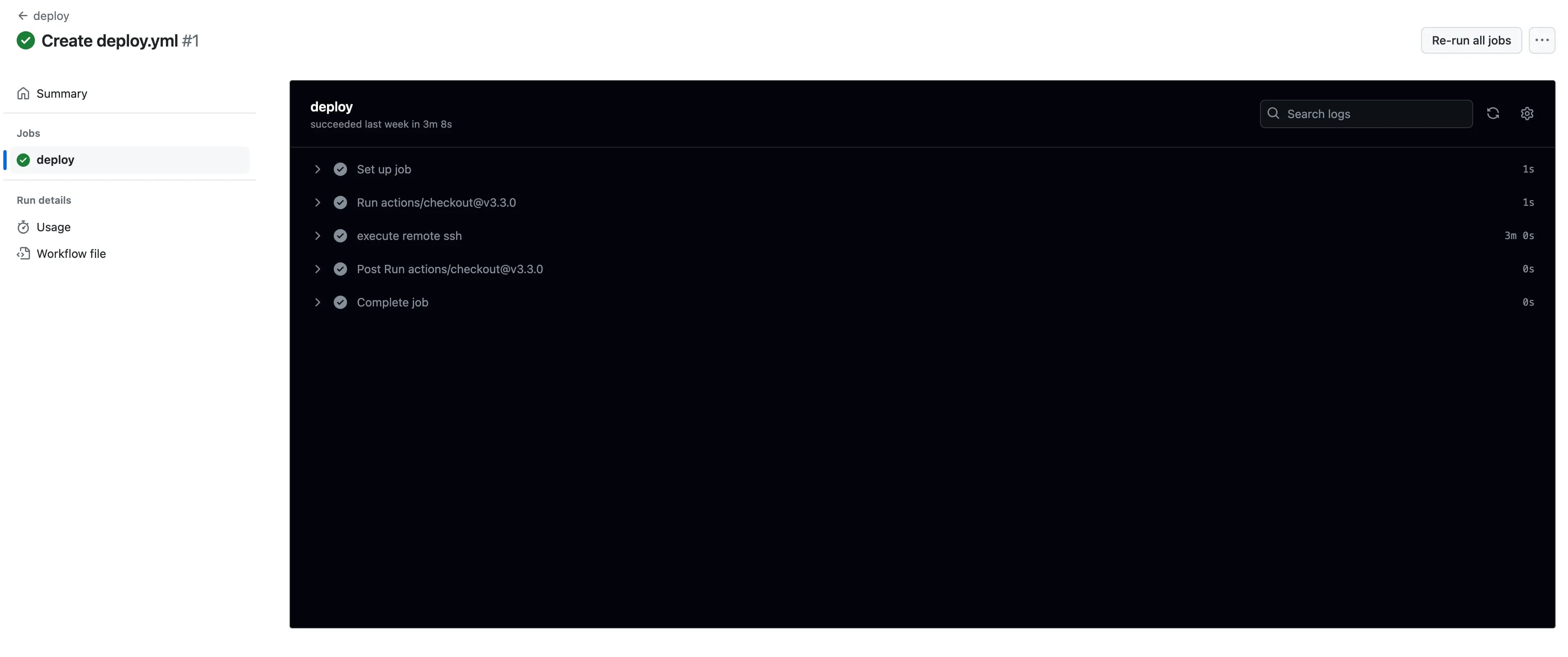

Currently, my project takes about 3 minutes on average.
Conclusion
I was able to easily deploy Next.js running in a Docker container by utilizing the pre-configured Nginx.
Additionally, I had relied on vercel for every project deployment, but by using the cloud to deploy directly, I learned many new things.
There may be incorrect parts in the process I configured, but I will continue to work on improving it in the future.