Mocking APIs with MSW
Mocking with MSW
As we progress through a project, we typically hold meetings before starting development to discuss what features to implement and
the data that corresponds to those features.
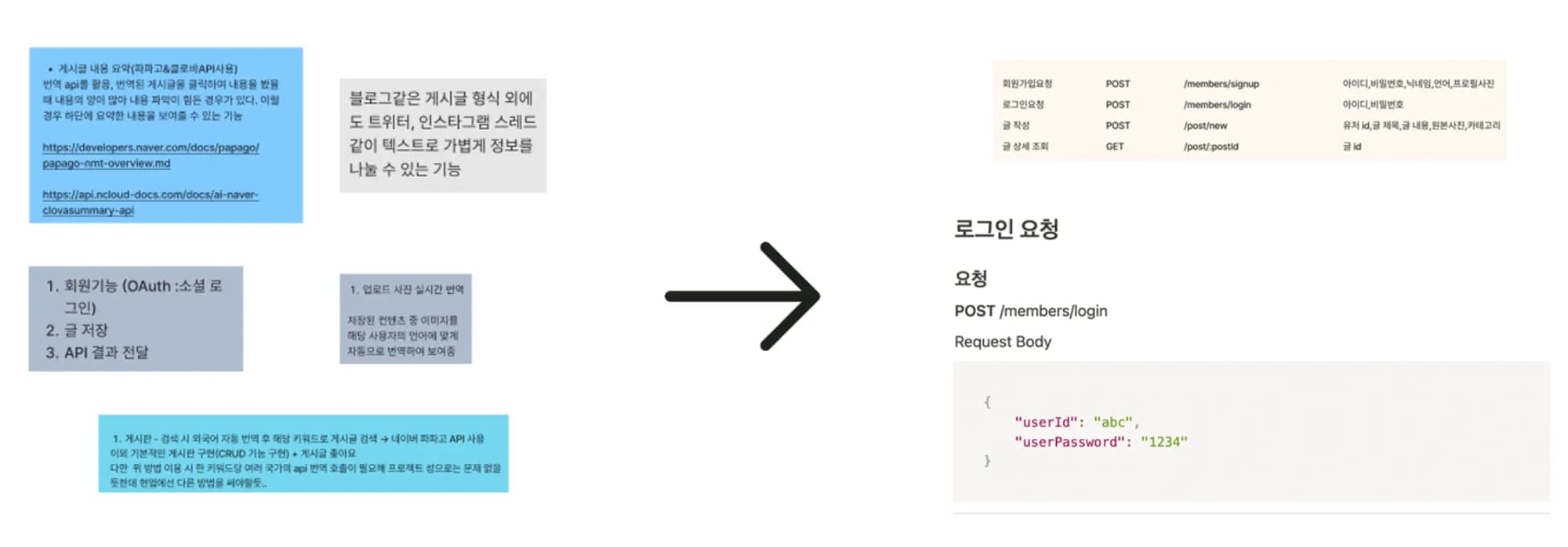

As a result, an API specification document is created that outlines how to access each piece of data, and frontend developers will make requests to the server according to these rules.
Why Mock?
In an ideal environment where frontend and backend can develop in sync, there would be no issues developing with real data.
However, I have realized through various projects that this is not an easy condition during the development phase.
From the perspective of a frontend developer, there are inevitably parts where one has to wait when the backend is not implemented.
Therefore, to complete the project on time, it would be more efficient to use and test the APIs that do not exist yet but will be created.
Introducing the MSW Library
msw is a library that can solve these issues, introducing itself as follows:
Mock by intercepting requests on the network level. Seamlessly reuse the same mock definition for testing, development, and debugging.
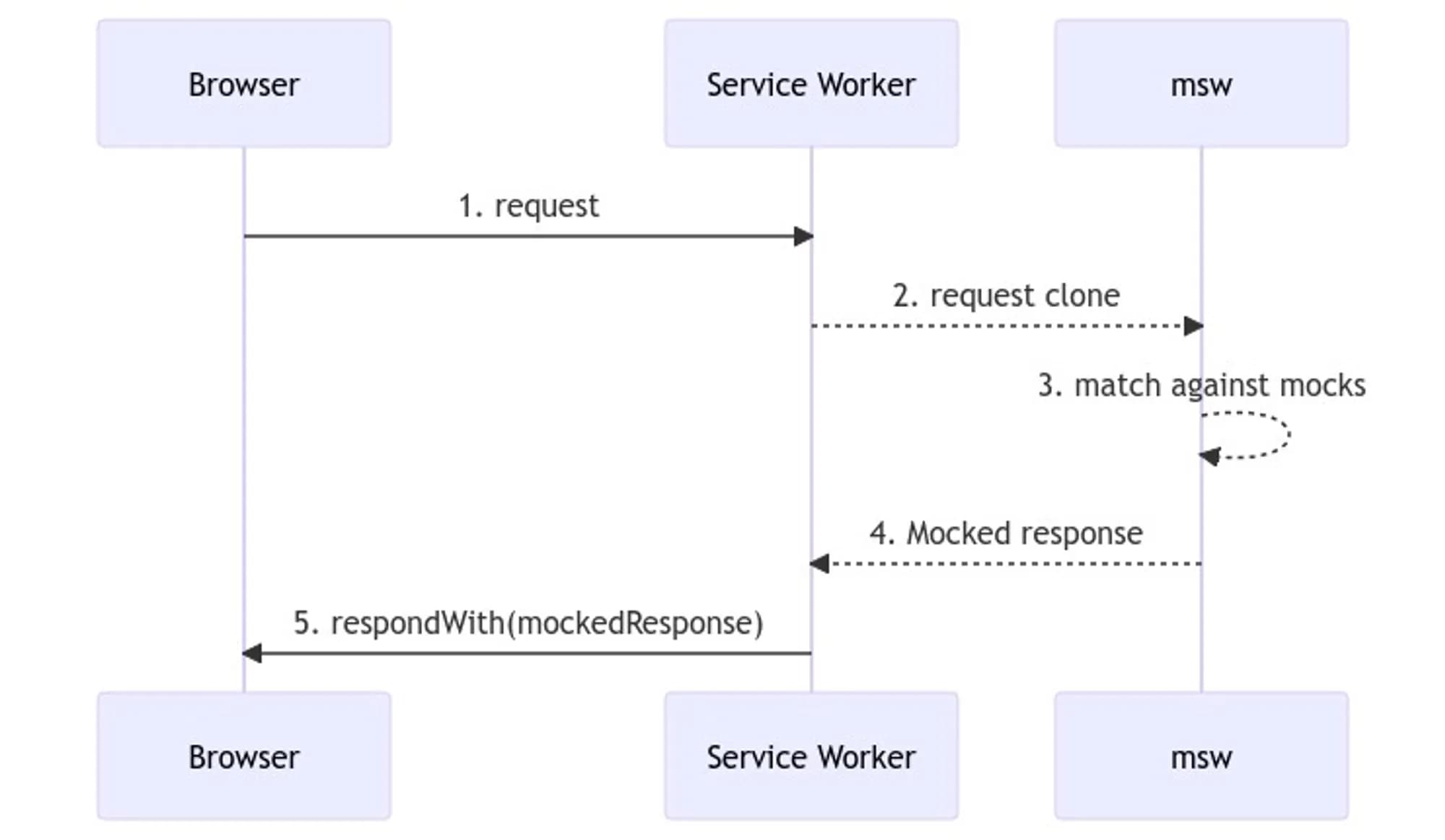
Mock Service Worker is an API mocking library that uses Service Worker API to intercept actual requests.
According to the description, it has the ability to mock by intercepting requests at the network level using the Service Worker API.

Using MSW in a Real Project
To use msw, you need to create a service worker, and the related files are usually placed under a mocks folder.
import { setupWorker } from 'msw'

import { handlers } from './handler'

export const worker = setupWorker(...handlers)
To run this service worker at the top level of the application, you need to include it in the top-level entry component.
(In my case, it's main.jsx.)
import { worker } from './mocks/worker'

// Start the MSW Mock server.
if (process.env.NODE_ENV === 'development') {
  worker.start()
}
Now, let's look at an example using the code applied in a real project.
We need to create dummy data called dummyKoPosts and write a handler that will respond when this data is requested.
// Dummy user data
export const dummyKoUser1: User = {
  id: 1,
  nickname: 'Elon Musk',
  language: 'ko',
  avatar:
    'https://upload.wikimedia.org/wikipedia/commons/thumb/3/34/Elon_Musk_Royal_Society_%28crop2%29.jpg/225px-Elon_Musk_Royal_Society_%28crop2%29.jpg',
  followers: 100,
};

// Dummy post data
export const dummyKoPosts: Post[] = [
  {
    id: 1,
    author: dummyKoUser1,
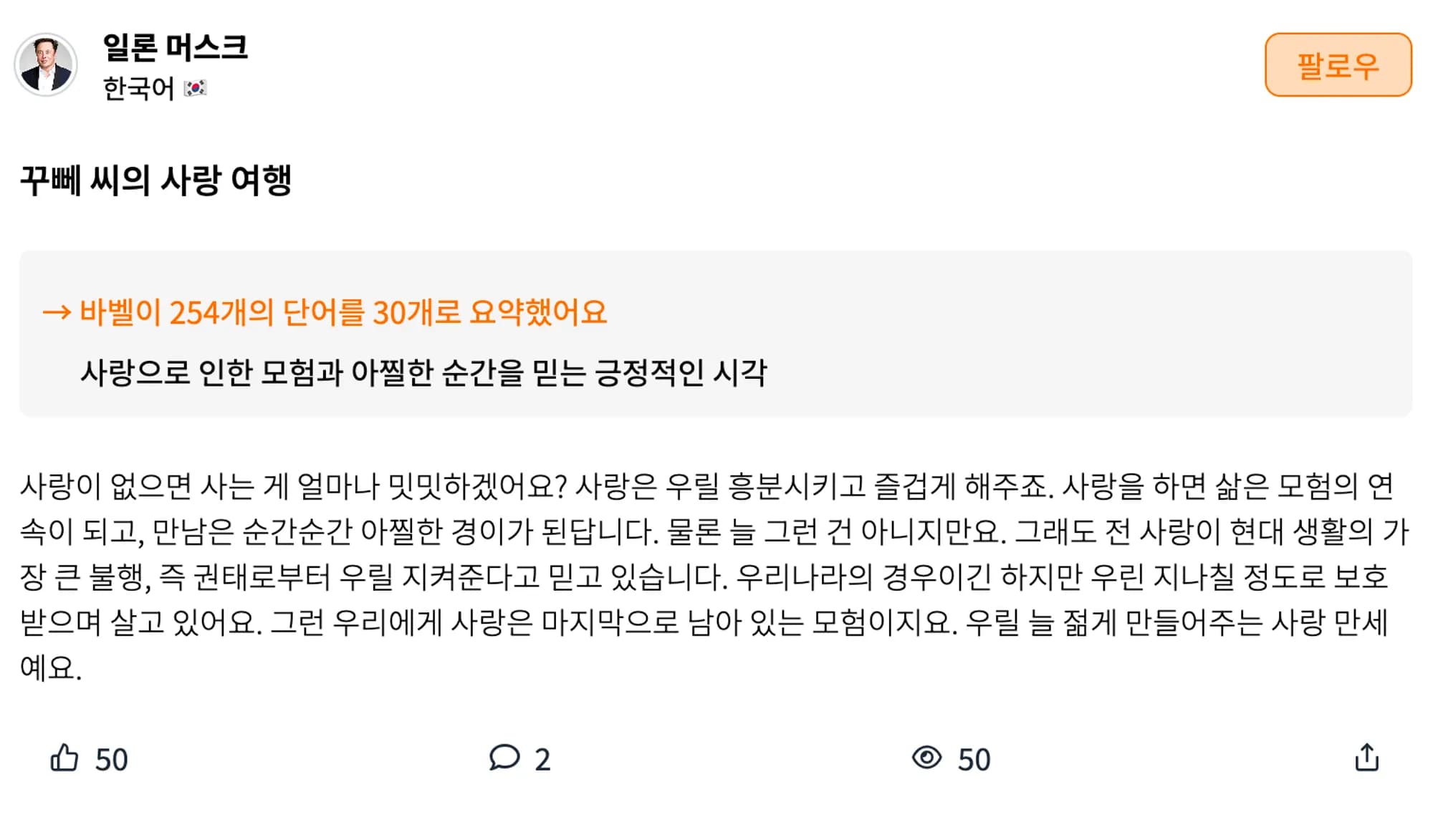
    title: 'The Love Journey of Mr. Kuppe',
    content:
      'How bland life would be without love? Love excites us and brings us joy. When we love, life becomes an adventure, and every encounter becomes a thrilling moment. Of course, it’s not always like that. But I believe that love protects us from the greatest misfortune of modern life, which is boredom. In our country, we live in a way that is overly protected. For us, love is the last remaining adventure. Long live love, which keeps us young.',
    summary: 'A positive perspective believing in the adventures and thrilling moments brought by love',
    photos: [],
    views: 50,
    likes: 50,
    comments: [
      {
        id: 1,
        author: dummyKoUser2,
        content: 'I enjoyed reading this!',
        created_at: '2023-08-07',
      },
      {
        id: 2,
        author: dummyKoUser3,
        content: 'This resonates with me!',
        created_at: '2023-08-07',
      },
    ],
    created_at: '2023-08-07',
    category: 'book',
  },
  ...
];export const handlers = [
rest.get(`/ko_post`, (req, res, ctx) => {
return res(ctx.status(200), ctx.json(dummyKoPosts))
}),
]Now, when you make a request to /ko_post using functions like fetch or axios, it will return dummyKoPosts with a 200 code, exactly as bound in the handler.
// Fetches the dummy post page.
export const getKoPostPage = async () => {
  const response = await axios.get('/ko_post')
  return response.data
}
When this call result is displayed on the actual project screen, it looks like this.

Conclusion
I discovered the mocking library msw while simply using dummy data, and I am finding it useful in the early stages of the project.
Additionally, it has the advantage of easily handling edge cases by directly manipulating network response statuses.
It would also be beneficial to study how to use the mocking code already created with testing tools like Jest or Storybook.